One platform, every operating surface.
FORNEBU is organized around six operating pillars. Each covers a different part of the restaurant day — all connected through one operating system.
The FORNEBU platform
One operating system. Specialized tools for every part of the restaurant.
FORNEBU connects the systems that run the restaurant while giving each part of the operation the tools it needs. From the counter and kitchen to inventory, customers, workforce and management, everything works from the same connected operational foundation.
FORNEBU POS
Ordering, customers, modifiers, payments and restaurant transactions in one fast counter workflow.
In the operationFORNEBU Kitchen
Kitchen display, preparation routing and order execution so every item reaches the station that makes it.
In the operationFORNEBU Inventory
Receiving, inventory counts, recipes, ingredients and stock movement tied to what the restaurant actually sold.
In the operationFORNEBU Loyalty
Customer profiles, visits, rewards and retention built from real purchases at the counter.
In the operationFORNEBU Workforce
Employees, skills, proficiency, availability and multi-location workforce management in one place.
ExploreFORNEBU Smart Schedule
Demand-driven restaurant scheduling built around expected workload, employee availability and operational capability.
ExploreFORNEBU Time
Clock-in/out, breaks, timesheets, actual work location and accountable labour hours.
In the operationFORNEBU Team
Team communication, tasks and duties and confidential 360° feedback, attached to the store, schedule and shift.
In the operationFORNEBU Intelligence
Turn restaurant operations into actionable insights — demand, labour, inventory, sales and operational exceptions, with the evidence behind each signal.
ExploreFORNEBU Control
Multi-location and multi-brand administration, permissions, operational controls, auditability and business oversight.
In the operationFrom order to payment, in one flow.
Everything the counter needs is on one screen: the menu, the modifiers, the customer, the reward and the payment. The order is built once, and the rest of the restaurant reads it from there. Discounts, complimentary items, voids and refunds require the right staff authorization and are recorded. Open food items — name, price, quantity and notes — are PIN-authorized and flow through tax, payment, receipt and refund like any other item.
Ordering
- Touch-first restaurant POS
- Product and menu hierarchy
- Departments, categories and subcategories
- Modifiers
- Substitutions and replacements with applicable upcharges
- Multi-brand ordering from one till
The customer at the counter
- Customer identification
- Loyalty and reward redemption
- Discounts
- Customer-facing display
Closing the sale
- Payment terminal integration architecture
- Receipts
- Refunds and voids
- Complimentary items with staff authorization
- PIN-authorized open food items
- Past orders
- Kitchen routing straight from the order
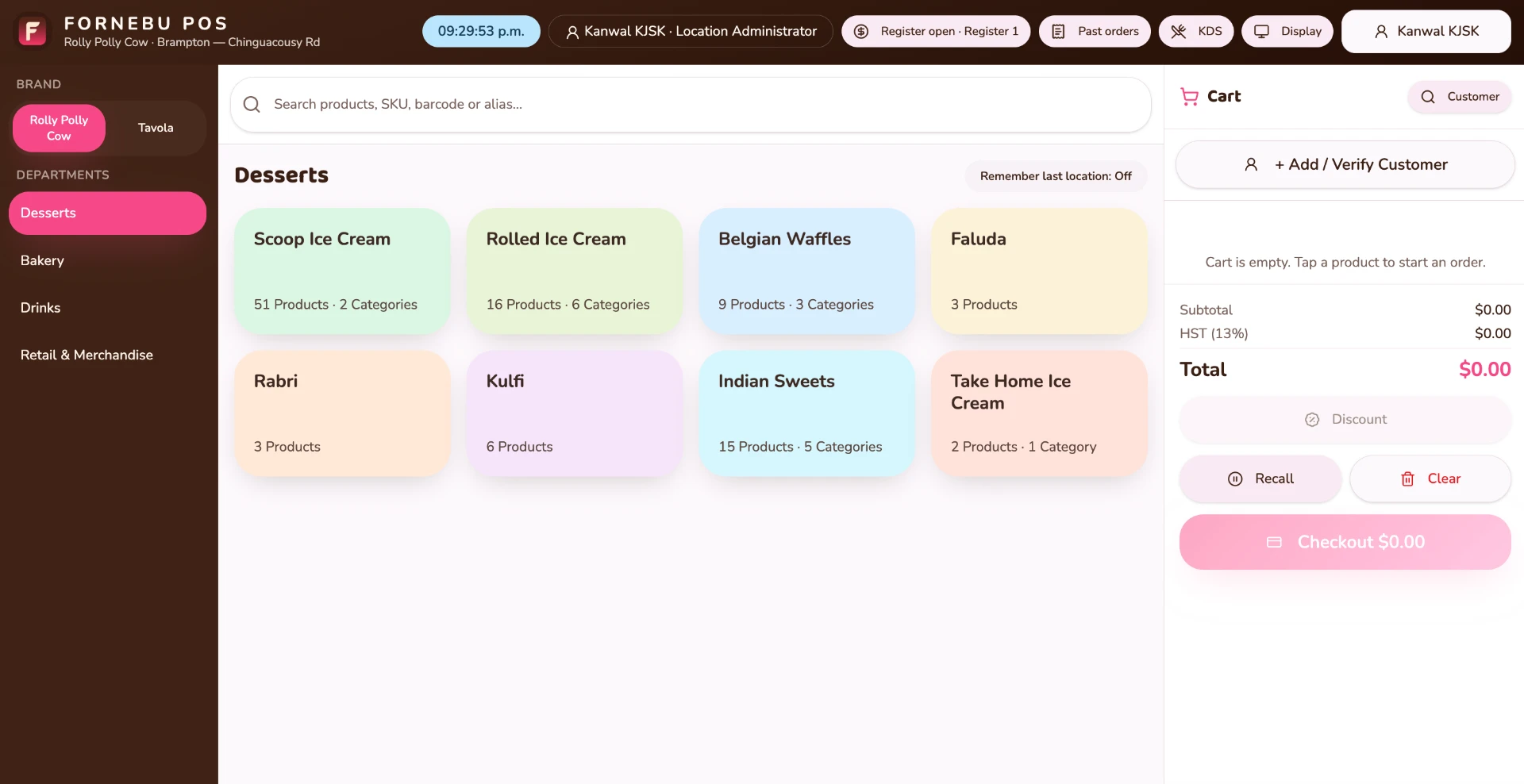
The moment the sale is confirmed, the kitchen already has the work.
The kitchen sees exactly what was sold.
Items land at the station that makes them, with the modifiers and instructions attached. The line works item by item, and the order is only ready when every item is. Register open and close, Business Day Close, printed or emailed receipts, customer display and kitchen display — all working from the same order.
Routing
- Kitchen Display System
- Kitchen stations
- Automatic station routing
- Mixed-brand kitchen routing
Production
- Item-level preparation workflow
- Modifiers and instructions reaching production
- Order status workflow
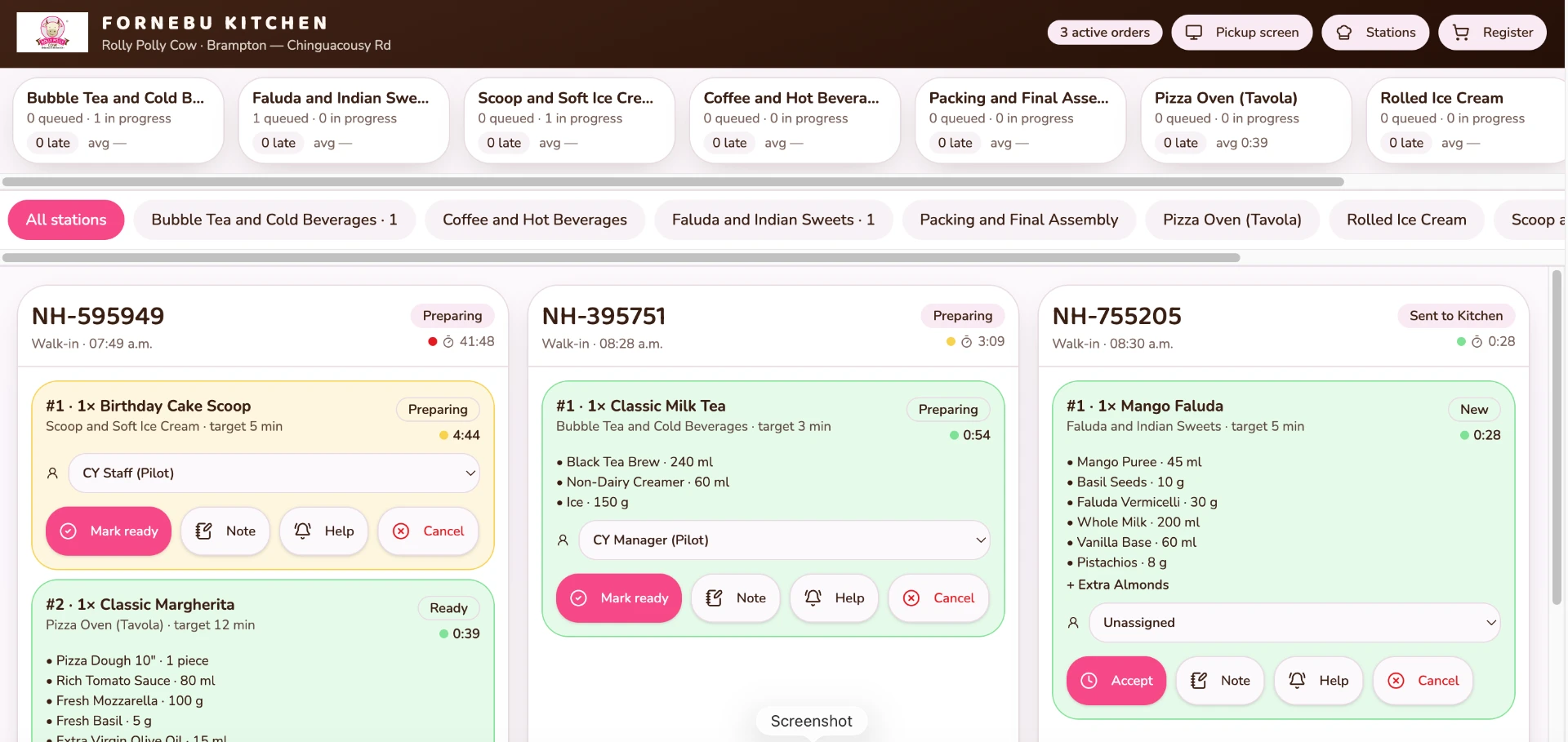
What the kitchen makes is what inventory counts against.
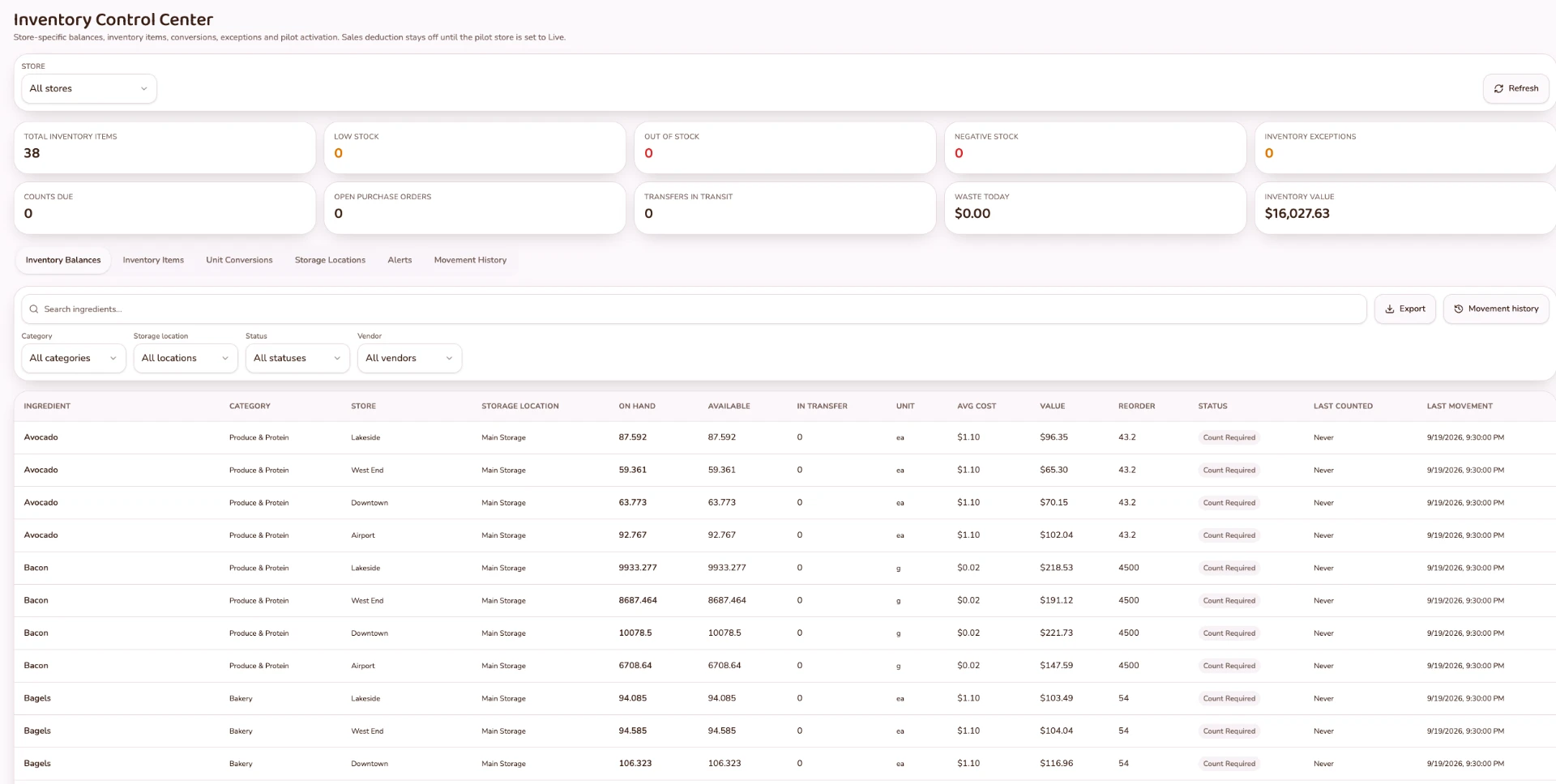
Know what you have and what you used.
Products, recipes and ingredients are held once, so what you sell explains what you consumed. Ingredients, recipes and packaging — including shared packaging — connect every sale to consumption. Receiving, purchase orders, vendors, guided Count Orders, adjustments and recipe costing then work from real movement, location by location.
Master data
- Product Master
- Recipes
- Ingredients
- Packaging, including shared packaging
Stock on hand
- Receiving
- Inventory counts
- Guided Count Orders
- Adjustments
- Inventory movement and variance
Replenishment
- Purchase orders
- Vendors
- Recipe costing
- Consumption tied to products, recipes and ingredients
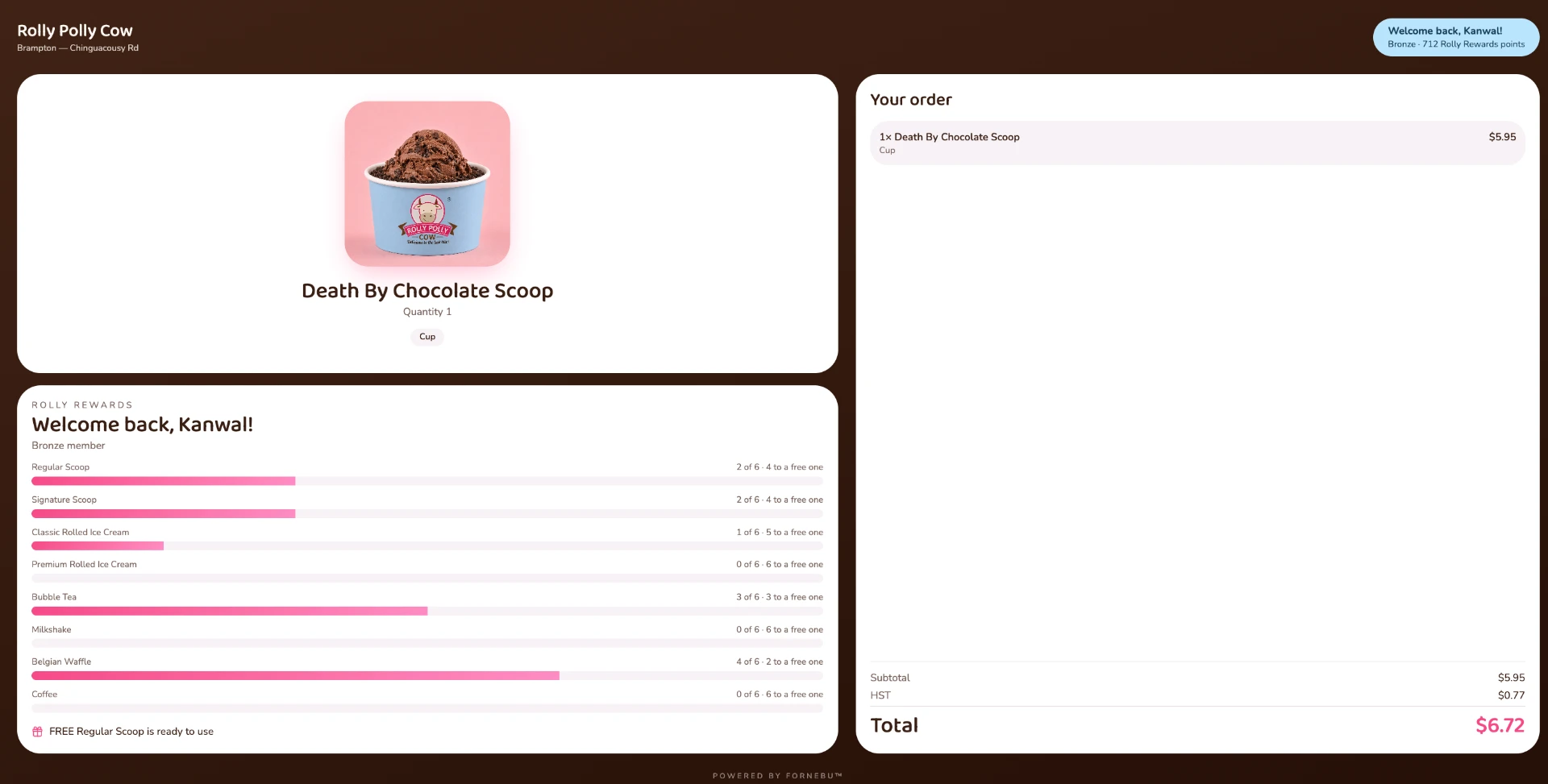
The same order that moves stock also builds the customer relationship.
Turn transactions into relationships.
Customers are recognised at the counter, and their history builds itself from real purchases. Loyalty progress and rewards are visible to the guest while the order is being taken. Business Health gives owners one view of sales, labour and costs — what changed, why, and what needs attention, with every figure traceable. Food & Packaging %, Prime Cost, Estimated Operating Profit and Break-even sales appear once the required cost information is complete. If the information isn't complete, FORNEBU says so. It doesn't guess. Demand intelligence uses the restaurant's own sales history; weather, holidays and local events are shown alongside as context.
Who the customer is
- Customer profiles
- Customer identification at POS
- Purchase and customer history
Loyalty
- Loyalty programs
- Loyalty progress
- Rewards and redemption
- Birthday and member rewards where supported
- Brand-specific loyalty
Offers
- Promotions where currently supported
Business Health
- Net sales, checks, average ticket and labour
- What changed, why it changed and what needs attention
- Traceable figures
- Food & Packaging %, Prime Cost, Estimated Operating Profit and Break-even sales once cost inputs are complete
Serving guests well depends on having the right people on the floor.
Run the people side of the restaurant.
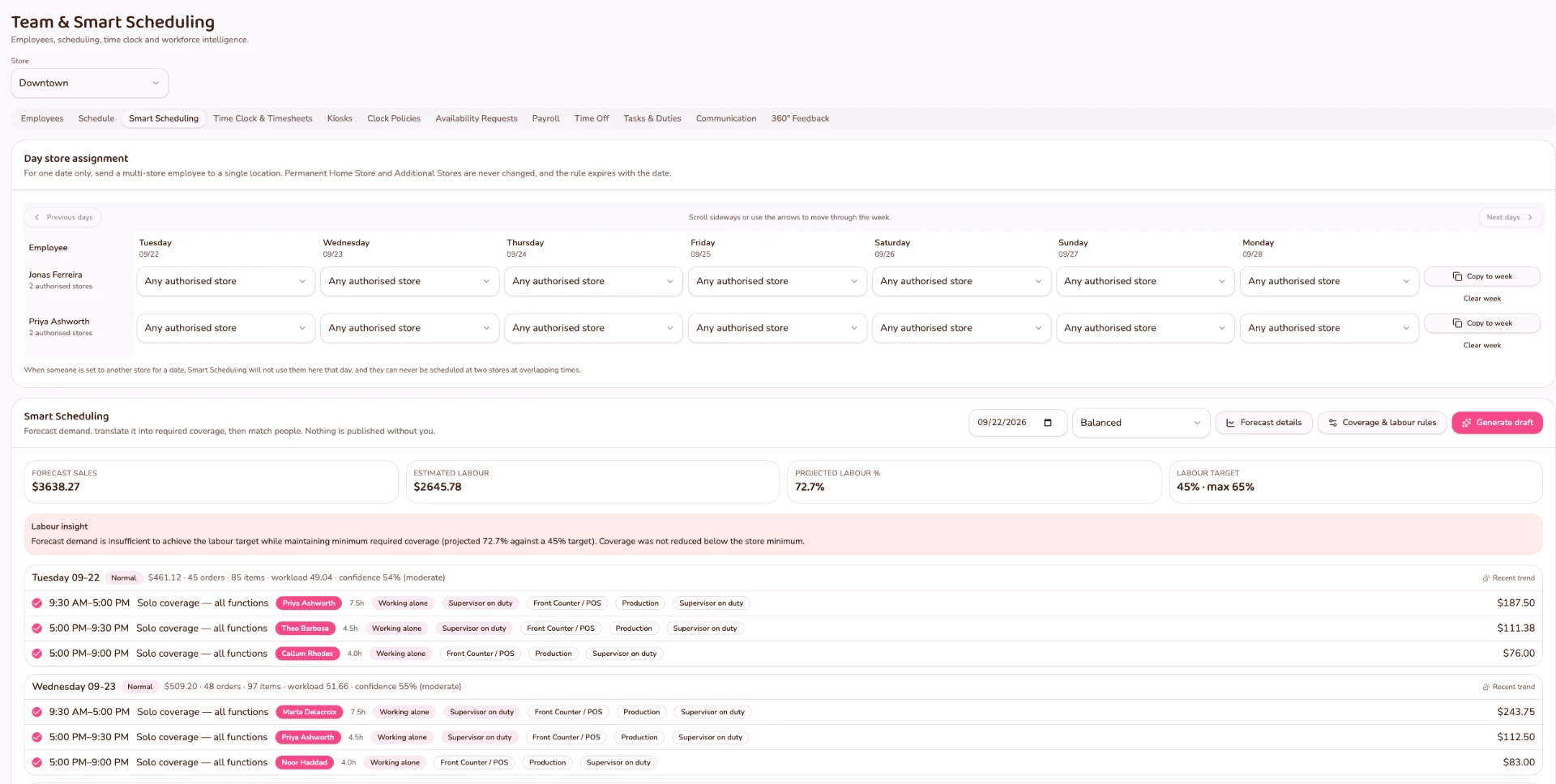
One employee record carries stores, roles, skills and availability. Smart Scheduling reads your own POS demand in 30-minute intervals to recommend coverage, the shared time clock turns those shifts into approved payroll hours, and communication, duties and structured feedback stay attached to the same team. The full story lives on the Workforce page.
Employee record
- Employee profiles
- Home and authorized stores
- Roles
- Skills and proficiency
- Recurring availability
- Week-specific availability
- Time off
Smart Schedule & Time Clock
- Demand Intelligence from actual POS demand in 30-minute intervals
- Required labour coverage
- Availability, skills and proficiency matching
- Manager-reviewed schedule recommendations
- Shared PIN Time Clock, breaks and timesheets
- Scheduled vs actual, exceptions and manager approvals
- Actual Store Worked and payroll attribution
- Tip distribution
- Payroll approval
Communication, Tasks & Duties, 360° Feedback
- Announcements, groups and direct messages
- Opening, during-shift and closing checklists
- Recurring responsibilities and weekly rotation
- Manager verification and completion notes
- Confidential multi-reviewer 360° feedback
- Anonymized aggregate results with owner-controlled access
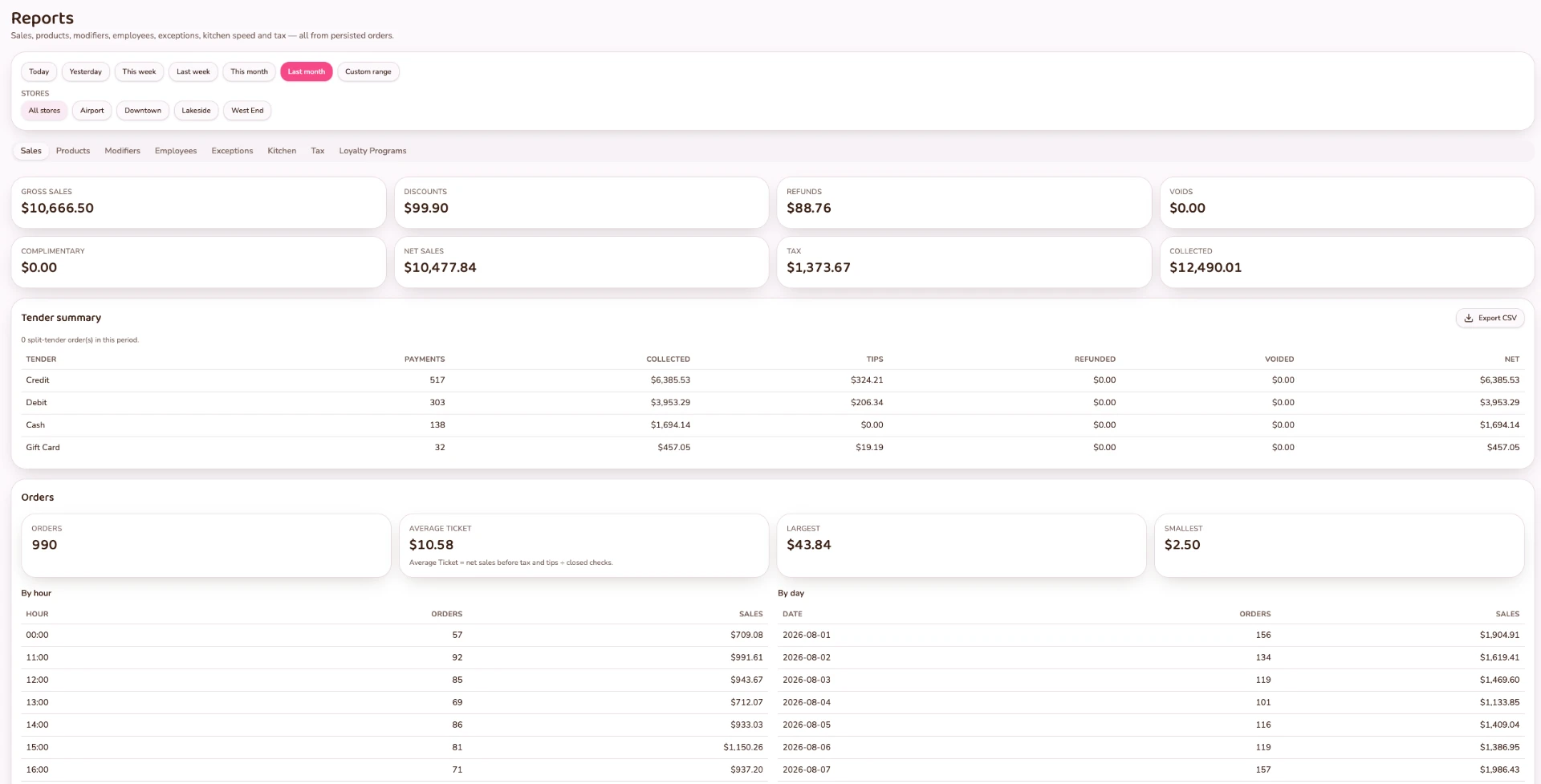
Every shift, sale and count rolls up into what the owner sees.
See and control the business.
Close the day with confidence and read the business across locations and brands. Sales, cash, access and operational changes stay visible, controlled and accountable. Corporate Golden Copy menus published to authorized locations, roles and permissions by location, franchise separation, exception and adjustment logs, and scheduled reports. FORNEBU manages the restaurant's receipt printers, kitchen printers and cash drawers through a small in-store device, so the equipment is set up and monitored from the same system.
Reporting
- Reporting
- Scheduled reports
- Email report delivery
Locations and brands
- Corporate Golden Copy menus published to authorized locations
- Multi-location management
- Multi-brand management
- Location-specific menu and product availability
- Store-scoped employee access
- Franchise separation
Cash and the business day
- Register sessions
- Cash management
- Opening floats
- Blind cash counts
- Variance tracking
- Business Day Close
Governance
- Permissions and access controls
- Store Network Access Controls
- Audit history
- Exception and adjustment logs
- In-store management of receipt printers, kitchen printers and cash drawers
In development. Delivery orders are being built to enter the same operating flow as counter orders, with kitchen, inventory and reporting staying connected. Keep your restaurant's in-store pricing intact while managing marketplace-specific pricing independently.
- Marketplace Order
- Restaurant Intake
- Kitchen Production
- Inventory
- Reporting
See the pillars working together.
See how Sell, Serve, Stock, Grow, Team and Control come together in one restaurant operating system.