Schedule around the restaurant you're expecting.
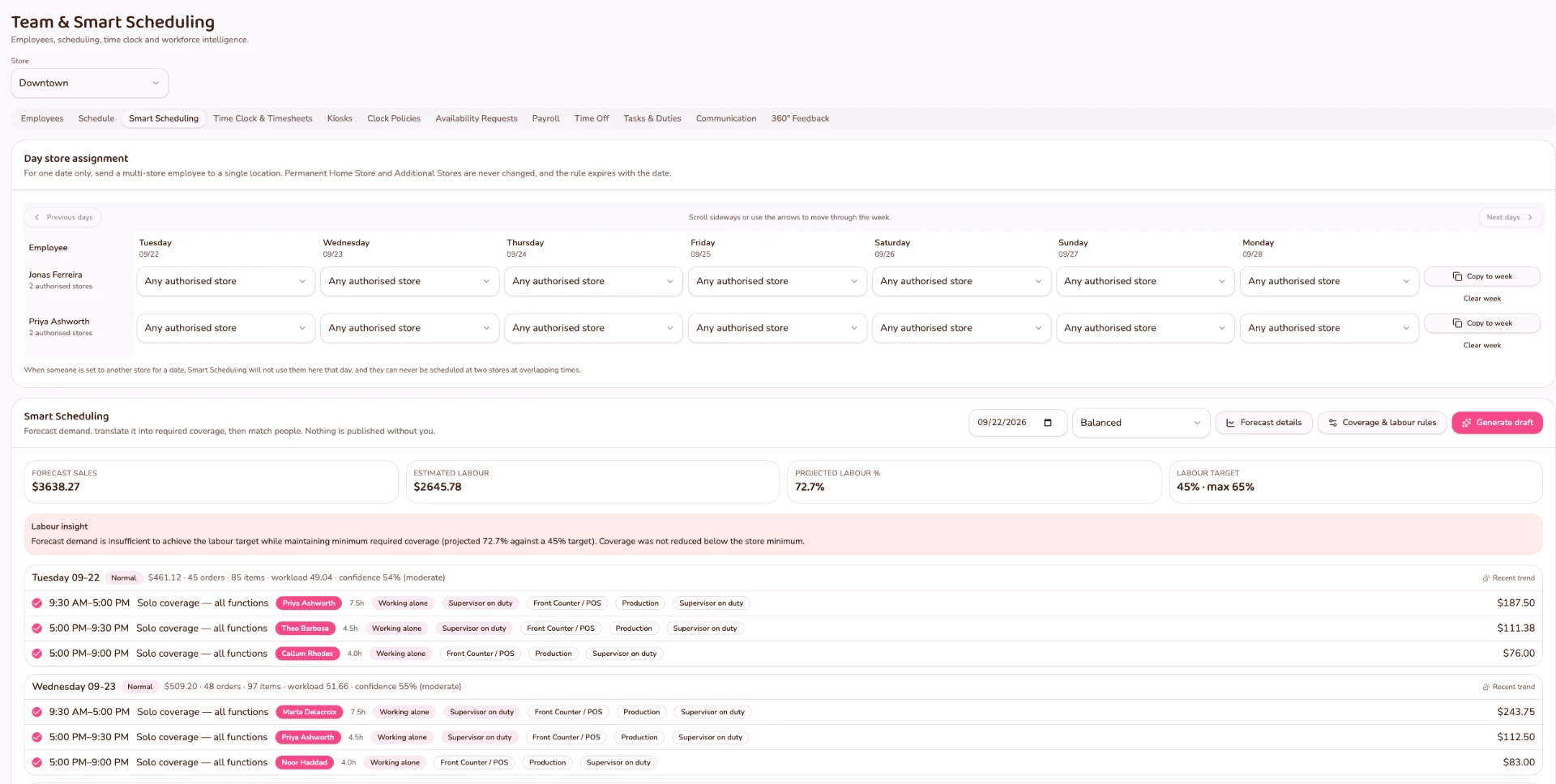
FORNEBU turns restaurant demand, required coverage, employee availability, approved time off, skills, labour targets and staffing requirements into a recommended schedule for manager review.
The system proposes. The manager decides.
Understand demand
FORNEBU uses the restaurant's own historical demand in 30-minute intervals to understand when the operation is likely to need more or less coverage.
Determine required coverage
Expected workload is translated into practical staffing requirements across the restaurant day.
Understand who can work
Availability, authorized work locations, skills, proficiency and working-hour constraints help determine which employees can cover that demand.
Build the recommended schedule
FORNEBU brings demand and workforce information together to construct practical shifts around the operation.
Manager review
The recommendation remains visible and explainable. The restaurant operator reviews the schedule before it is published.
Demand determines how many people are needed. Skills determine who can cover it.
FORNEBU doesn't begin with an empty calendar. It begins with the restaurant.
FORNEBU Intelligence
Understand demand before deciding labour.
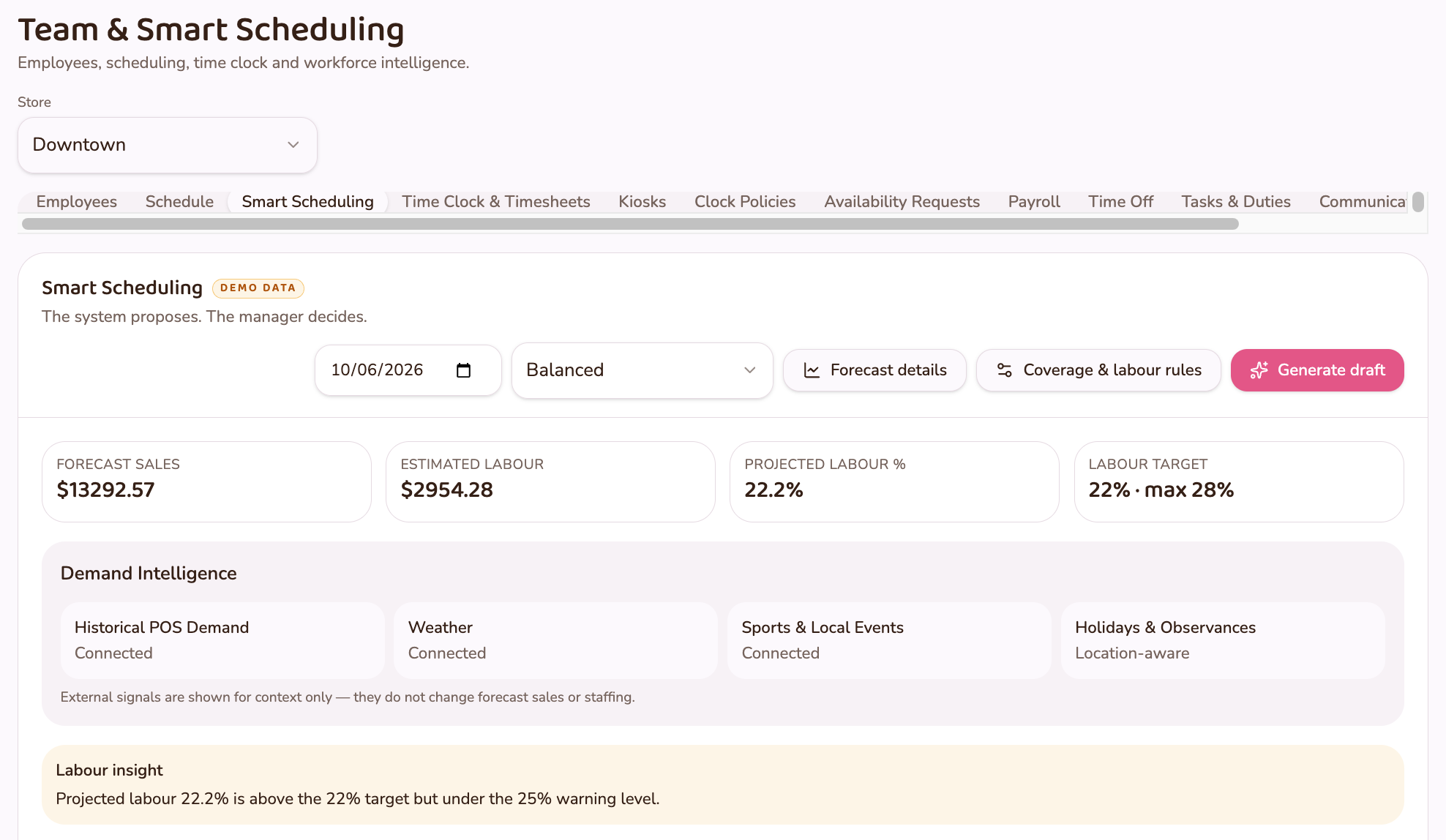
FORNEBU Demand Intelligence turns restaurant sales and order history into an explainable view of expected demand. Smart Schedule can then use that operational picture when recommending coverage.
Schedule for the restaurant you expect — not simply for the employees who happen to be available.
- 01Restaurant History
- 0230-Minute Demand
- 03Required Coverage
- 04Availability + Skills
- 05Recommended Schedule
- 06Manager Review
- Historical restaurant demand
- The operation's own sales history is the starting point for expected demand.
- Orders and items
- Order and item volume describe the work the restaurant actually produced.
- 30-minute operating intervals
- Demand is understood in half-hour intervals rather than flat daily totals.
- Demand confidence
- Recommendations carry a sense of how consistent the underlying pattern is.
- Actual versus forecast
- Comparing expected demand against what happened keeps accuracy reviewable over time.
- Manager-reviewed recommendations
- The output is a recommendation for the operator — not an automatic decision.
FORNEBU can place expected demand alongside contextual signals such as weather, local events and holidays, giving the operator more context when reviewing the recommendation.
These signals provide context; the forecast remains grounded in the restaurant's own operating history.
Demand Intelligence is one part of the intelligence layer that connects the whole restaurant — sales, inventory, customers, labour and locations.
Explore FORNEBU IntelligenceFrom demand to the shift
See why the schedule looks the way it does.
FORNEBU keeps the inputs behind the recommendation visible — expected demand, required coverage, employee availability and operational capability — so the manager can understand the recommendation before publishing it.
- Expected Demand
- Required Coverage
- Available + Qualified Employees
- Recommended Shifts
- Manager Review
It knows more than availability
Availability is only part of the decision.
The objective isn't simply to fill open hours. It is to match labour to the operation while respecting who can work and what coverage the restaurant requires.
Scheduled → Worked
The schedule doesn't disappear when the shift begins.
FORNEBU connects the published schedule to clock-in, breaks, actual hours, work location, exceptions and timesheets — giving management a clearer view of what was scheduled and what actually happened. Compare scheduled labour with the hours actually worked.
- 01Recommended Schedule
- 02Manager Review
- 03Published Shift
- 04Clock In
- 05Actual Hours
- 06Timesheet
- Scheduled vs. actual
- Understand the difference between planned and worked labour.
- Actual store worked
- Labour hours remain attributed to the location where the employee actually worked.
- Exceptions stay visible
- Early arrivals, late arrivals, unscheduled work and approved amendments remain accountable.
- One employee record
- Availability, skills, schedule and worked hours remain connected.
Stop building schedules from an empty calendar.
Start with the restaurant you're expecting, the coverage it needs and the people who can actually provide it.